How to Repurpose Instagram Reels for TikTok and YouTube Shorts Without Losing Quality
A strong Instagram Reel should not have to stop working after its first upload. If the idea, footage, and message are yours, the same creative asset can introduce you to new audiences on TikTok and YouTube Shorts. The opportunity is obvious: create once, distribute more widely, and get more value from the time already spent scripting, filming, and editing.
The mistake is treating repurposing as a blind copy-and-paste exercise. Instagram, TikTok, and YouTube all support short-form video, but people use them differently. The opening that earns a pause on Instagram may feel slow on TikTok. An Instagram caption may be useless as a YouTube title. Music that is available inside one platform may not be cleared for use somewhere else.
A better workflow separates the core video from the platform-specific wrapper around it. You preserve the best possible source file, then adapt the hook, audio, caption, metadata, and call to action for each destination. This guide walks through that process without adding hours of repetitive work.

Figure 1. One clean master video can become three platform-ready short-form posts.
How to Repurpose Instagram Reels Safely
Repurposing begins with ownership. Use videos you created yourself, commissioned with appropriate reuse rights, or received explicit permission to publish. The fact that a Reel is public does not make it free to reuse, and crediting the original creator does not automatically replace permission.
Music needs the same care. A song available in Instagram’s music library may be licensed for use within Instagram but handled differently on TikTok or YouTube. When you plan to distribute a video across multiple platforms, the safest starting point is original audio, properly licensed music, or a clean version of the video to which you can add music separately on each destination.
For client work, define reuse rights before production begins. A simple agreement covering the video, voiceover, music, graphics, and distribution channels prevents confusion later. It also makes the repurposing workflow much easier to automate.
1. Preserve a High-Quality Instagram Reel Source File
The original exported video is almost always the best repurposing source. It has not been compressed by a social platform, it does not contain interface elements, and it gives you the most flexibility when creating destination-specific versions.
Keep a local master before you publish the first Reel. Use a clear file name, save the editable project when practical, and keep a clean export without an Instagram logo, username badge, or platform-specific call to action burned into the image. If you want captions on every version, save one master with captions and another without them.
If the only available copy is on your public Instagram profile, an Instagram video downloader can help you recover your own Reel. Treat that as a backup path, not the ideal production workflow. Repeatedly downloading, editing, exporting, and uploading the same file can introduce visible compression. A single clean master protects quality and saves time.
Do not try to rescue a small or heavily compressed clip by enlarging it. Upscaling cannot restore detail that has already disappeared. Preserve the video’s original vertical composition, export once at a high quality, and let each destination perform only the compression it needs.
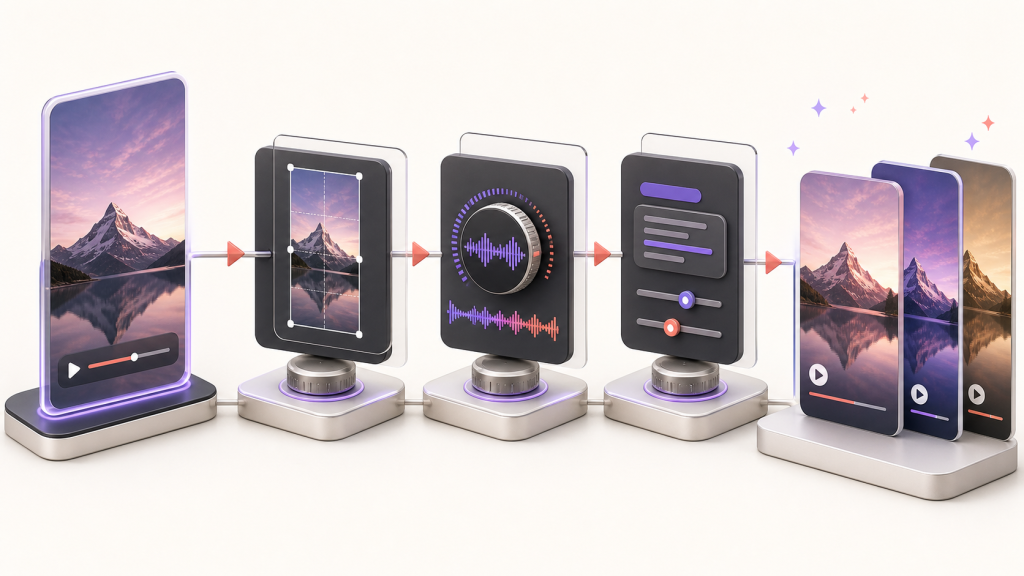
Figure 2. Preserve the master, adapt the frame, audio, and metadata, then publish.
2. Remove Instagram Watermarks and Platform-Specific Elements
Before sending a Reel elsewhere, look for elements that only make sense on Instagram. A spoken line such as “check the link in my bio,” an on-screen Instagram handle, or a caption that asks viewers to save the Reel may feel misplaced on another platform.
You do not need to rebuild the entire video. Focus on the elements that affect comprehension and action. Replace destination-specific calls to action, keep important text away from areas likely to be covered by interface buttons, and make sure the opening frame explains the idea without relying on an Instagram caption.
This is also the point to review music. If the file includes a track added inside Instagram, create a clean audio version before publishing elsewhere whenever possible. You can then use original audio, a track for which you hold suitable rights, or music added through the destination platform’s own tools.
3. How to Post Instagram Reels to TikTok
TikTok viewers decide quickly whether to keep watching. Bring the most interesting moment forward and make the promise of the video obvious in the first sentence or visual beat. A slow logo animation, long introduction, or context-heavy opening that works for existing Instagram followers may lose people who are discovering you for the first time.
Rewrite the caption rather than copying a long Instagram description. A concise hook, a useful keyword or two, and a small number of relevant hashtags usually make the post easier to understand. If a native TikTok sound, sticker, reply, or text treatment adds genuine context, apply it inside TikTok instead of permanently baking it into every version.
The goal is not to imitate every TikTok trend. It is to make your original idea feel intentional on the platform. Keep the creator’s voice, but remove signals that make the upload look like an afterthought.
4. How to Turn Instagram Reels Into YouTube Shorts
YouTube adds an important layer that Instagram does not: the title. Treat the title as a promise and a discovery signal, not as a recycled caption. Describe what the viewer will learn, see, or feel. For educational videos, a clear phrase such as “How to light a product video with one lamp” is more useful than a vague caption such as “You need to try this.”
Think about the Short as part of a larger channel. If you have a related long-form video, playlist, or series, guide interested viewers toward it. A Short can introduce the problem, demonstrate one result, and invite viewers to continue with a deeper resource.
Review the audio separately before uploading. Copyright-protected music used on another platform can trigger a claim or restriction on YouTube. Use audio you control, properly licensed material, or music available through YouTube’s own creation tools. Also check the finished upload rather than assuming the preview and published version will behave identically.
5. Manual Reposting vs. Automatic Instagram-to-TikTok Crossposting
Manual publishing makes sense when every destination needs a substantially different edit, when you rely heavily on native music and effects, or when you publish only occasionally. It gives you complete control, but it also creates a repeated checklist every time a Reel goes live.
Automation becomes more useful when Instagram is your consistent source channel, the main video can travel intact, and the repetitive distribution work is stopping you from publishing regularly. The right system should remove mechanical work without pretending every platform is identical.
If Instagram is the channel you publish to first, Automatically Post Your Instagram Reels To TikTok can automate the Instagram-to-TikTok publishing step and remove the repeated download-and-upload loop from your routine. Automation handles distribution; you still decide whether a Reel’s music, caption, and creative treatment fit TikTok.
Video tutorial

Save Hours Every Week | Instagram To TikTok Auto Posting
Publisher embed code:
<iframe width=”100%” style=”aspect-ratio: 16 / 9;” src=”https://www.youtube.com/embed/bUKxY65WGlk” title=”Save Hours Every Week | Instagram To TikTok Auto Posting” frameborder=”0″ allow=”accelerometer; autoplay; clipboard-write; encrypted-media; gyroscope; picture-in-picture; web-share” allowfullscreen></iframe>
A hybrid workflow is often the practical answer. Automate the destinations that can use the core asset as-is, then reserve manual edits for posts that depend on native sounds, platform-specific features, or a different creative angle.
6. Instagram Reel Repurposing Quality Checklist
Before publishing the repurposed versions, check each destination independently:
- You own the video or have clear permission to reuse it.
- The source is the cleanest available file rather than a screen recording.
- No unwanted platform watermark, interface element, or old username is visible.
- The music and other third-party assets are suitable for the destination.
- The first frame and opening sentence make sense without the Instagram caption.
- On-screen text remains readable and is not crowded against the edges.
- The TikTok caption and YouTube title are written for their respective platforms.
- The call to action points viewers toward something that exists on that platform.
- The published version plays correctly and retains acceptable visual and audio quality.
Frequently Asked Questions About Reposting Instagram Reels
Can you post the same Instagram Reel on TikTok and YouTube Shorts?
Yes. When you own the video or have permission to reuse it, the same core asset can work on all three platforms. Use a clean source file, then adapt the hook, caption, title, audio, and call to action for each destination.
Should you remove the Instagram watermark before posting to TikTok?
Start from a clean master whenever possible. Removing platform-specific branding makes the upload feel intentional and avoids the quality loss that can come from repeated downloading and re-exporting.
Can you reuse Instagram music on TikTok or YouTube Shorts?
Do not assume that music licensed inside Instagram is cleared elsewhere. Use original audio, properly licensed music, or a clean video version and add suitable music through each destination platform.
How do you keep video quality when reposting a Reel?
Save the original vertical master, export it once at a high quality, avoid screen recordings and repeated download cycles, and inspect the published version on each platform.
How to Measure Repurposed Reel Performance
A Reel, TikTok, and Short can produce very different view counts without one version being a failure. Each platform starts with a different audience, recommendation system, and viewer intent. Compare the signals that matter on that platform: watch time, completion rate, shares, comments, profile visits, followers, subscribers, and clicks into the rest of your content.
Keep a simple record of the hook, title, caption, and publishing date used for each version. After several posts, patterns become visible. You may learn that tutorials perform best on YouTube, reactions travel well to TikTok, and behind-the-scenes clips earn more saves on Instagram. Those differences should shape the next edit rather than discourage repurposing.
Avoid judging the entire strategy from a single crossposted video. A repeatable sample gives you enough evidence to decide which content ideas travel well, which destinations deserve more adaptation, and where automation saves meaningful time.
Repurpose Instagram Reels Without Repeating the Upload Work
Repurposing is not about flooding every feed with identical files. It is about separating the expensive creative work from the repetitive publishing work. Preserve a clean master, respect ownership and music rights, adapt the wrapper for each destination, and automate the mechanical steps that do not require creative judgment.
When that system is in place, one Instagram Reel can become more than a single post. It can start conversations on TikTok, introduce your expertise through YouTube Shorts, and keep delivering value long after the original upload.